Chapter 8 · GTK 4 with PyGObject
Desktop Integration
Every listing in this chapter is a file under
examples/gtk4/desktop/. They are run on each build, so if one of them stops working the build says so.
Introduction
A program that opens a window is not yet an application. It has no name in the launcher, no icon, nowhere to keep preferences, no way to be told to open a file, and no way to ask for a password without inventing its own storage. This chapter is about the rest of it.
Most of what the previous edition covered here has been replaced. GConf is gone and GSettings took over. gnome-keyring’s API is gone and libsecret took over. And a newer idea sits underneath all of it: portals. On a modern desktop your program may be running in a sandbox with no access to the file system, the printer, the camera or the network beyond what it has been granted. Portals are how it asks. The useful part is that GTK’s own dialogs already go through them, so code written the normal way works sandboxed and unsandboxed without changing.
The application id
Nearly everything in this chapter keys off one string:
app = Gtk.Application(application_id="com.example.Settings")
The id decides the name of your desktop file, the name of your icon, the D-Bus name you are activated on, the GSettings path convention, and which notifications are yours. Get it right early — changing it later means changing five other things.
The rules: reverse-DNS, using a domain you actually control, matching the file names
around it. com.example.Settings wants
com.example.Settings.desktop, com.example.Settings.svg and
com.example.Settings.gschema.xml. If you have no domain, GitHub-based ids like
io.github.username.AppName are conventional and accepted by Flathub.
Settings
GConf is gone. GSettings replaced it, and the difference that matters is that GSettings keys are declared in advance. A schema states every key, its type, its default and what it is for. There is no writing a key that does not exist, and no reading one and wondering what type comes back.
The schema
<?xml version="1.0" encoding="UTF-8"?>
<schemalist>
  <schema id="com.example.Settings" path="/com/example/Settings/">

    <key name="greeting" type="s">
      <default>'Hello'</default>
      <summary>The word to greet with</summary>
      <description>Shown in the entry, and remembered between runs.</description>
    </key>

    <key name="enabled" type="b">
      <default>true</default>
      <summary>Whether the greeting is shown at all</summary>
    </key>

    <key name="repeat" type="i">
      <default>1</default>
      <range min="1" max="10"/>
      <summary>How many times to repeat the greeting</summary>
    </key>

    <key name="window-size" type="(ii)">
      <default>(420, 280)</default>
      <summary>The last window size</summary>
    </key>

  </schema>
</schemalist>
The type is a GVariant type string: s string, b boolean, i int32,
d double, as array of strings, (ii) a pair of int32s. String defaults need
their own quotes inside the XML, which is the mistake everyone makes once.
<range> is enforced — writing 20 to repeat fails rather than storing it. The
summary and description are read by settings editors and by translators.
The schema is compiled, not parsed at runtime:
sudo install -m 644 com.example.Settings.gschema.xml /usr/share/glib-2.0/schemas/
sudo glib-compile-schemas /usr/share/glib-2.0/schemas/
Forgetting glib-compile-schemas gives you a hard abort — GLib treats a missing
schema as a programming error and calls abort(), so the message is
“Settings schema ‘com.example.Settings’ is not installed” followed by a crash
rather than an exception you can catch.
While developing, you do not have to install anything. Compile into a temporary directory and load from there:
source = Gio.SettingsSchemaSource.new_from_directory(
    str(compiled), Gio.SettingsSchemaSource.get_default(), False
)
schema = source.lookup(SCHEMA_ID, False)
settings = Gio.Settings.new_full(schema, None, None)
The example does exactly that, falling back to it when the schema is not installed,
which is why it runs from a checkout. GSETTINGS_SCHEMA_DIR in the environment
does the same thing for a program you do not want to modify.
Reading and writing
settings = Gio.Settings.new("com.example.Settings")

greeting = settings.get_string("greeting")
repeat = settings.get_int("repeat")
settings.set_string("greeting", "Good morning")
settings.reset("greeting")            # back to the schema default
For types without a typed accessor, go through GVariant:
width, height = settings.get_value("window-size").unpack()
settings.set_value("window-size", GLib.Variant("(ii)", (800, 600)))
Writes are queued and applied asynchronously. That is normally invisible, but a
program that writes settings and then immediately exits should call
Gio.Settings.sync() first.
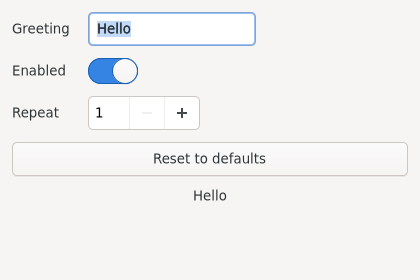
Binding, which is the good part
Most settings drive a widget, and for that there is no need for callbacks at all:
settings.bind("greeting", entry, "text", Gio.SettingsBindFlags.DEFAULT)
settings.bind("enabled", switch, "active", Gio.SettingsBindFlags.DEFAULT)
settings.bind("repeat", spin, "value", Gio.SettingsBindFlags.DEFAULT)
That is the whole preferences dialog: typing in the entry stores the value, and
changing the value elsewhere updates the entry. DEFAULT is two-way; GET is
read-only, which is how one key can also control another widget’s sensitivity:
settings.bind("enabled", entry, "sensitive", Gio.SettingsBindFlags.GET)
For anything that is not a widget property, watch the key:
settings.connect("changed::greeting", lambda s, key: refresh())
settings.connect("changed", lambda s, key: refresh())      # any key
Because the value changes when anything writes it, a program that reacts to
changed rather than to its own widgets stays correct when two of its windows are
open, when the user edits the key in dconf-editor, and when a system policy
overrides it.
The full example is examples/gtk4/desktop/settings.py.
Where files go
Settings cover preferences. For everything else there are the XDG base directories, and GLib knows all of them:
GLib.get_user_config_dir()     # ~/.config       — configuration you write
GLib.get_user_data_dir()       # ~/.local/share  — data the user would miss
GLib.get_user_cache_dir()      # ~/.cache        — safe to delete at any time
GLib.get_user_state_dir()      # ~/.local/state  — logs, recent files, window state
GLib.get_user_runtime_dir()    # /run/user/1000  — sockets, lock files; gone at logout

GLib.get_user_special_dir(GLib.UserDirectory.DIRECTORY_DOWNLOAD)
Put your own directory inside one of those, named after your application id.
Never build a path by joining ~ with .myapp: the XDG environment variables move
these directories, some distributions do move them, and inside a Flatpak they are
redirected into the sandbox. GLib.get_user_special_dir() also returns the
translated name, so a French user’s downloads are found in
~/Téléchargements without your knowing about it.
The distinction between cache and data is worth honouring. Anything in the cache directory may be deleted while your program is not running, and anything in the data directory gets backed up. Putting a database in the cache loses it; putting thumbnails in data means backing them up forever.
Desktop files
A .desktop file is what puts your program in the launcher:
[Desktop Entry]
Type=Application
Version=1.5
Name=Settings Example
Comment=Shows how GSettings stores preferences
Exec=settings-example %U
Icon=com.example.Settings
Terminal=false
Categories=Utility;GTK;
Keywords=settings;preferences;example;
StartupNotify=true
DBusActivatable=true
Name, Comment and Keywords are shown to the user and should be translated —
add Name[de]=… lines, or let your build system merge them from your .po files.
Exec must name something on PATH or give an absolute path, and it is not a
shell command line: no pipes, no redirection, no quoting tricks. The %U is a field
code that expands to the URIs the program was asked to open — %F for local file
paths, %u/%f for a single one. A file manager passing you a document is
%U at work, so leave it in even if you ignore it for now.
Icon should be an icon name, not a path — the base name of a file you
installed into the icon theme:
~/.local/share/icons/hicolor/scalable/apps/com.example.Settings.svg
Categories decides where the entry appears in menus that still have categories,
and the valid values are a fixed list in the freedesktop menu specification.
Inventing one silently does nothing.
DBusActivatable=true says your application id is a D-Bus name and the desktop may
start you by activating it rather than by running Exec. Gtk.Application already
does everything needed for this; it is what makes a second launch raise your
existing window instead of starting a second copy.
Install into ~/.local/share/applications for one user or
/usr/share/applications for everyone, then update the caches:
update-desktop-database ~/.local/share/applications
gtk-update-icon-cache -f -t ~/.local/share/icons/hicolor
Skipping those is why a new entry sometimes does not appear until the next login. And validate the file — the parser is stricter than it looks:
desktop-file-validate ~/.local/share/applications/com.example.Settings.desktop
The full example is examples/gtk4/desktop/install-desktop-file.sh.
Notifications need one
The notification API in More GTK 4 only works if
an installed desktop file’s basename matches the application id. Without it,
send_notification() succeeds and nothing appears. This is the single most common
“my notifications do not work” cause, and there is no error to go looking for.
Passwords
Passwords do not belong in GSettings. GSettings values are readable by anything in the user’s session, are synchronised by some setups and end up in backups in the clear.
libsecret talks to the Secret Service — gnome-keyring on GNOME, KWallet on KDE:
gi.require_version("Secret", "1")
from gi.repository import Secret

SCHEMA = Secret.Schema.new(
    "com.example.Passwords",
    Secret.SchemaFlags.NONE,
    {"service": Secret.SchemaAttributeType.STRING,
     "username": Secret.SchemaAttributeType.STRING},
)

Secret.password_store(
    SCHEMA, {"service": "com.example.Passwords", "username": "alice"},
    Secret.COLLECTION_DEFAULT,
    "Example password for alice",     # shown in the keyring UI
    password, None, on_stored,
)
The schema here is a lookup key, not a security boundary: the attributes are what you search by when you want the password back. They are stored unencrypted — only the secret itself is protected — so do not put anything sensitive in an attribute.
Every call has a synchronous and an asynchronous form, and you want the asynchronous one. The keyring may be locked, in which case the desktop prompts the user for their password, and the synchronous call blocks your interface until they answer.
Handle “not found” separately from “failed”. password_lookup_finish() returns
None when there is simply nothing stored, and raises GLib.Error when something
went wrong — a locked keyring the user refused to unlock, or no Secret Service at
all, which is normal on a bare X session.
The full example is examples/gtk4/desktop/passwords.py.
Opening things
Shelling out to xdg-open is no longer necessary, and does not work in a sandbox.
GTK 4.10 added launchers that go through the portal when there is one:
launcher = Gtk.UriLauncher(uri="https://gtk.org/")
launcher.launch(window, None, on_done)

launcher = Gtk.FileLauncher(file=Gio.File.new_for_path(path))
launcher.launch(window, None, on_done)          # open it
launcher.open_containing_folder(window, None, on_done)   # or show it in the file manager
Asynchronous, like every other dialog, with a launch_finish() that raises if it
did not work. Passing the parent window lets the portal show its confirmation
dialog on top of yours.
To find out what would open a file, or to offer a choice, Gio.AppInfo still
answers:
info = Gio.AppInfo.get_default_for_type("text/plain", False)
print(info.get_display_name())
The full example is examples/gtk4/desktop/launch-and-locate.py.
Portals and the sandbox
Under Flatpak your process has no access to the file system outside its own directories, and none to the printer, camera, screen or location. Portals bridge that: a request goes over D-Bus to a service outside the sandbox, which asks the user, and the answer comes back as a specific grant.
The good news for this book is how little of it you have to write. These already go through a portal when there is one:
Gtk.FileDialog— the user picks a file, and your sandbox is granted that file.Gtk.PrintOperation— the print dialog and the job.Gtk.UriLauncherandGtk.FileLauncher.Gio.Notification.- libsecret.
Which means a program written the way this chapter describes is already
sandbox-ready. The rest — screenshots, screen casting, location, running in the
background, autostart, inhibiting suspend — has no GTK wrapper, and you either
speak to the D-Bus interface directly (see D-Bus) or use the
libportal library, which wraps them all.
Two habits make the difference between a program that works sandboxed and one that does not:
Ask for files through a dialog rather than guessing paths. A grant follows what
the user chose. os.listdir(os.path.expanduser("~")) does not, and returns almost
nothing inside a sandbox.
Keep hold of the Gio.File you were given, not a path string you derived from
it. Under the portal the path may exist only for as long as the grant does.
Summary
- The application id names your desktop file, icon, D-Bus name and notifications. Pick it once, in reverse DNS, and make everything match.
- GSettings keys are declared in a schema, which is compiled and installed. Missing schema means an abort, not an exception.
settings.bind()connects a key to a widget property in both directions, and is most of what a preferences dialog needs.- Use
GLib.get_user_*_dir()rather than building paths from~. Cache is deletable; data is backed up. - A
.desktopfile needs a matching icon name, valid categories andupdate-desktop-databaseafterwards — and notifications do not work without one. - Passwords go in libsecret, asynchronously, never in GSettings.
Gtk.UriLauncherandGtk.FileLauncherreplacexdg-openand work in a sandbox.- GTK’s own dialogs already go through portals; ask for files rather than guessing
paths, and keep the
Gio.File.
Audio and Video with GStreamer is next.