Chapter 6 · GTK 4 with PyGObject
Custom Widgets
Every listing in this chapter is a file under
examples/gtk4/custom-widgets/. They are run on each build, so if one of them stops working the build says so.
Introduction
The previous edition of this book had a chapter called Custom Widgets containing one line: “This chapter is not yet written :)”. This is that chapter.
There are three levels of “custom widget”, and most of the time the answer is the first one:
Compose. Subclass an existing container, build some children in __init__,
and give it properties and signals so the rest of the program sees one thing.
Draw. Subclass Gtk.Widget and override do_snapshot() — covered in
Drawing with Cairo, where the meter widget
does exactly this.
Lay out. Subclass Gtk.Widget and override do_measure() and
do_size_allocate() as well, so it can arrange children GTK has no container for.
Only the third is genuinely hard, and only because the sizing contract has a rule that is easy to miss. That rule is the most useful thing in this chapter.
Compose first
Before overriding anything, ask whether you are making a new kind of widget or a reusable arrangement of existing ones. It is nearly always the second.
class SearchBar(Gtk.Box):
    __gtype_name__ = "SearchBar"

    query = GObject.Property(type=str, default="")
    scope = GObject.Property(type=int, default=0)

    @GObject.Signal(arg_types=(str, int))
    def search_requested(self, query, scope):
        """Default handler; there is nothing for it to do."""

    def __init__(self, **kwargs):
        super().__init__(orientation=Gtk.Orientation.HORIZONTAL, spacing=6, **kwargs)

        self._entry = Gtk.SearchEntry(hexpand=True, placeholder_text="Search…")
        self._scope = Gtk.DropDown.new_from_strings(SCOPES)
        self._button = Gtk.Button(label="Search")

        self.append(self._entry)
        self.append(self._scope)
        self.append(self._button)
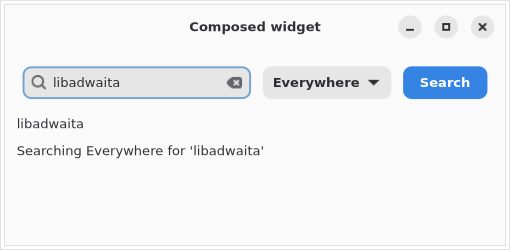
What makes this a widget rather than a helper function is the public surface — the properties and the signal from GObject. From outside, nothing needs to know there is an entry and a drop down inside:
search.connect("search-requested", lambda _b, query, scope: ...)
search.bind_property("query", label, "label", GObject.BindingFlags.SYNC_CREATE)
Inside, connect the children to the properties with bindings rather than handlers, so the widget and its state cannot drift apart:
self._entry.bind_property("text", self, "query",
                          GObject.BindingFlags.BIDIRECTIONAL
                          | GObject.BindingFlags.SYNC_CREATE)
Two details make a composed widget feel like a real one. Prefix the children with
an underscore — they are implementation, and something will eventually reach in
and grab them if you do not. And override grab_focus() to forward to whichever
child should actually get the focus:
def grab_focus(self):
    return self._entry.grab_focus()
For anything with more than a handful of children, put the layout in a .ui file
and use Gtk.Template, as in
More GTK 4. The class is the same shape; only
where the children come from changes.
The full example is examples/gtk4/custom-widgets/composed-widget.py.
A widget that lays out children
When no existing container does what you need — and GTK has a lot of them, so
check first — you subclass Gtk.Widget and implement three methods.
GTK 4 has no GtkContainer. There is no add() to override and no child list
to maintain. A child is parented to you, and the widget itself keeps the list:
def append(self, child):
    child.set_parent(self)

def children(self):
    child = self.get_first_child()
    while child is not None:
        yield child
        child = child.get_next_sibling()
Unparent your children, or GTK complains
def do_dispose(self):
    child = self.get_first_child()
    while child is not None:
        next_child = child.get_next_sibling()
        child.unparent()
        child = next_child
    Gtk.Widget.do_dispose(self)
Leave this out and you get, at some later and unrelated moment:
Finalizing GtkWidget, but it still has children left
Take the next sibling before unparenting, because unparenting is what detaches it from the list you are walking.
Measuring
def do_measure(self, orientation, for_size):
    return minimum, natural, min_baseline, nat_baseline
GTK asks how big you would like to be, then gives you a size that may be
different, then asks you to draw. The contract is that do_measure must not lie:
a widget asking for less than it needs gets clipped, and one asking for more
leaves holes.
Return -1, -1 for the baselines unless you are aligning text across widgets.
The rule that catches everyone
If your height depends on your width — a wrapping layout, a text flow, anything that reflows — you must say so:
def do_get_request_mode(self):
    return Gtk.SizeRequestMode.HEIGHT_FOR_WIDTH
The default is CONSTANT_SIZE, which tells GTK that height does not depend on
width. GTK then never passes a real width to do_measure(): for_size is
always -1, your widget measures itself as one row tall however narrow it gets,
and the rows below the first are silently clipped.
Nothing warns. The widget looks correct at its natural width and wrong at every other width, which is exactly the case you are least likely to test first.
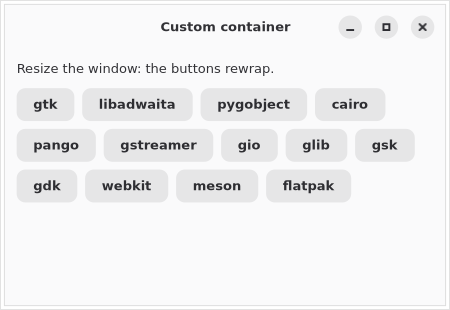
It is worth seeing the difference. The wrapping example below, laid out at 300 pixels wide, genuinely occupies three rows:
row y=0:  ['alpha', 'bravo', 'charlie']
row y=42: ['delta', 'echo', 'foxtrot', 'golf']
row y=84: ['hotel']
With the default request mode, measure(VERTICAL, 300) reports 34 — one row.
With HEIGHT_FOR_WIDTH it reports 118, which is what the layout actually
needs.
Allocating
def do_size_allocate(self, width, height, baseline):
    for child in self.children():
        transform = Gsk.Transform().translate(Graphene.Point().init(x, y))
        child.allocate(child_width, child_height, -1, transform)
A child is positioned by a transform, not by an x/y pair — which is what makes it possible to rotate or scale a child, and why the drawing chapter’s snapshot transforms compose with layout.
Ask each child how big it wants to be rather than assuming:
child_width = child.measure(Gtk.Orientation.HORIZONTAL, -1)[1]
child_height = child.measure(Gtk.Orientation.VERTICAL, child_width)[1]
Note the second call passes the width — that is how you get a correct height from a child that is itself height-for-width.
Write the walk once and use it for both. The example’s _layout() places
children when asked to allocate and only totals up the height when asked to
measure:
def _layout(self, visible, width, allocate=False):
    ...
    if allocate:
        child.allocate(child_width, child_height, -1, transform)
    ...
    return total
Measuring and allocating with two separate pieces of code is the classic way to get a container that is subtly the wrong size, because the two drift apart the first time one of them is edited.
Drawing
A container usually only has to draw its children, and the default implementation already does:
def do_snapshot(self, snapshot):
    Gtk.Widget.do_snapshot(self, snapshot)
Override it properly only when you want to draw around the children — a background, a focus ring, separators between rows.
The full example is examples/gtk4/custom-widgets/flow-box-widget.py.
Layout managers
There is a fourth option worth knowing. Instead of putting the layout logic in
the widget, put it in a Gtk.LayoutManager:
class WrapLayout(Gtk.LayoutManager):
    __gtype_name__ = "WrapLayout"

    def do_get_request_mode(self, widget):
        return Gtk.SizeRequestMode.HEIGHT_FOR_WIDTH

    def do_measure(self, widget, orientation, for_size): ...
    def do_allocate(self, widget, width, height, baseline): ...


widget.set_layout_manager(WrapLayout())
The methods are the same, with the widget passed in. The advantage is that the
layout can be swapped at runtime and reused on any widget — which is how
Gtk.BoxLayout, Gtk.GridLayout and Gtk.BinLayout are implemented, and why
Gtk.Box is a thin wrapper around one.
Use a layout manager if the arrangement is reusable; put it in the widget if it is specific to that widget.
Styling and accessibility
Give the widget its own CSS name so it can be styled without depending on the class name:
class WrapBox(Gtk.Widget):
    __gtype_name__ = "WrapBox"

    def __init__(self, **kwargs):
        super().__init__(**kwargs)
        self.set_css_name("wrapbox")
wrapbox { padding: 6px; }
And tell the accessibility layer what it is, because a Gtk.Widget subclass
defaults to a role that means nothing to a screen reader:
class Meter(Gtk.Widget):
    __gtype_name__ = "Meter"

    def __init__(self, **kwargs):
        super().__init__(accessible_role=Gtk.AccessibleRole.PROGRESS_BAR, **kwargs)
        self.update_property([Gtk.AccessibleProperty.VALUE_NOW], [0.35])
A composed widget usually needs nothing here — its children already carry their own roles — which is one more argument for composing.
Summary
- Compose before you subclass
Gtk.Widget. Properties and signals are what make a composed widget a widget; use bindings inside it and forwardgrab_focus(). - There is no
GtkContainer. Children are parented, and walked withget_first_child()/get_next_sibling(). - Unparent every child in
do_dispose(), taking the next sibling first. - If height depends on width, override
do_get_request_mode(). Without itfor_sizeis always-1, the widget measures one row tall, and the rest is clipped with no warning. - Children are placed with a
Gsk.Transform, not an x/y pair. - Measure children with
child.measure(), passing the width when asking for a height. - Use one code path for measuring and allocating.
- Put reusable arrangements in a
Gtk.LayoutManager. - Set a CSS name, and set an accessible role on anything that draws itself.
Printing is next.