Chapter 4 · GTK 4 with PyGObject
Threads and Asynchronous Work
Every listing in this chapter is a file under
examples/gtk4/threads/. They are run on each build, so if one of them stops working the build says so.
Introduction
Everything your program does happens on one thread, in one loop. A callback that takes 200 ms makes the window stutter; one that takes two seconds makes it stop responding, stop redrawing, and — if the user clicks anything — get reported to the desktop as hung.
So the question this chapter answers is: how do you do something slow without that happening?
There are four answers, and picking the right one matters more than the details of any of them:
Use an asynchronous API. For files, network and D-Bus, Gio already has one. No thread, no locking, no marshalling. This should be your first choice and it usually is not, because starting a thread looks more familiar.
Use async/await. PyGObject can run asyncio on the GLib main loop, which
turns those Gio calls into ordinary await expressions and lets you use any
async def library. On PyGObject 3.50 or later this is the pleasantest option in
the chapter, and it has its own section.
Use a thread. For work that is genuinely CPU-bound, or a blocking library with no async version. Compute on the thread, touch no widgets, hand the result back to the main loop.
Break the work up. For something that can be done in pieces, do a piece per idle callback and let the loop breathe between them.
The one rule
GTK is not thread-safe. Widgets belong to the main thread.
Not “prefer the main thread” — only the main thread. Reading a label’s text from a worker is undefined behaviour just as much as setting it. It will appear to work for months and then corrupt something.
GTK 2 had gdk_threads_enter() and gdk_threads_leave(), and the previous
edition of this book used them. They are gone, with no replacement. There is
no lock you can take to make widget access safe from another thread; the answer
is not to do it.
What you get instead is one function:
GLib.idle_add(callback, *args)
GLib.idle_add and GLib.timeout_add are safe to call from any thread, and
the callback they schedule runs on the main thread. That is the entire interface
between a worker and your interface, and it is enough.
A callback returning GLib.SOURCE_REMOVE (False) runs once; returning
GLib.SOURCE_CONTINUE (True) runs again. Forgetting to return anything means
None, which is falsy, which happens to mean “run once” — so the bug only shows
up when you meant to repeat.
Asynchronous I/O, without threads
For anything that waits on the world rather than on the CPU, Gio has it covered already:
file = Gio.File.new_for_path(path)
file.load_contents_async(cancellable, self.on_read_done)


def on_read_done(self, file, result, _data=None):
    try:
        ok, contents, _etag = file.load_contents_finish(result)
    except GLib.Error as error:
        return
    text = contents.decode("utf-8", "replace")
This is the same shape as the dialogs in
Getting Started and the D-Bus calls in
D-Bus: an *_async that returns immediately, a callback, and a
*_finish that either gives you the value or raises GLib.Error.
Nearly everything has one — reading, writing, copying, deleting, enumerating a directory, resolving a hostname, opening a socket, making an HTTP request through libsoup. Enumeration is asynchronous twice over, once to open the directory and again per batch of entries:
folder.enumerate_children_async(
    "standard::name,standard::size,standard::type",
    Gio.FileQueryInfoFlags.NONE, GLib.PRIORITY_DEFAULT,
    cancellable, self.on_enumerate_done,
)
...
enumerator.next_files_async(50, GLib.PRIORITY_DEFAULT,
                            cancellable, self.on_files_done)
That batching is deliberate: a directory with a hundred thousand files does not arrive as one hundred-thousand-element list that blocks the loop while it is built.
Learn this callback shape first, because it is the one the GTK documentation is
written in and the one you will read in other people’s code. Then know that on
PyGObject 3.50 and later you can drop the callback argument and await the same
call instead, which is the section on asyncio below.
Cancellation
Every async Gio call takes a Gio.Cancellable, and this is where it earns its
place over a thread:
self.cancellable = Gio.Cancellable()
file.load_contents_async(self.cancellable, self.on_read_done)
...
self.cancellable.cancel()
Cancelling makes the pending *_finish() raise, and you can tell that case apart
from a real failure:
except GLib.Error as error:
    if error.matches(Gio.io_error_quark(), Gio.IOErrorEnum.CANCELLED):
        self.status.set_text("cancelled")
    else:
        self.status.set_text(f"failed: {error.message}")
This is real cancellation — the operation actually stops. A thread you have asked to stop keeps running until it next checks the flag, and if it is blocked in a syscall it may never check at all.
Use one cancellable per operation, not one for the program. Reusing a cancelled
one makes every future operation fail immediately, which is a confusing bug to
find. If you must, cancellable.reset().
The full example is examples/gtk4/threads/gio-async.py.
Threads
When the work is genuinely CPU-bound, or the library you have to call has no asynchronous version, use a thread — and keep it strictly on the far side of the line:
def on_start(self, _button):
    self.cancel = threading.Event()
    self.thread = threading.Thread(target=self.run, daemon=True)
    self.thread.start()


def run(self):
    """Off the main thread. No widget access."""
    result = slow_work(self.cancel, self.report_progress)
    GLib.idle_add(self.on_finished, result)


def report_progress(self, done, total):
    GLib.idle_add(self.on_progress, done, total)


def on_progress(self, done, total):
    """Back on the main thread."""
    self.progress.set_fraction(done / total)
    return GLib.SOURCE_REMOVE
The worker’s only contact with the interface is GLib.idle_add. Everything else
is ordinary Python.
Four things worth doing every time:
daemon=True, so a half-finished worker cannot keep the process alive after
the last window closes.
Cancel with a threading.Event the worker checks between units of work.
This is cooperative — the worker stops when it next looks — which is the best a
thread can do.
Disable the button that starts it. Two clicks should not start two workers unless you meant it.
Put a spinner somewhere. If it stops turning, something is blocking the main thread, and it tells you at a glance.
About the GIL
Python threads do not run Python bytecode in parallel, so a thread will not make pure-Python computation faster — it only keeps it off the main thread, which is what you wanted anyway.
Where they genuinely run in parallel is in C code that releases the GIL, which
includes most of what you would actually thread: file and socket I/O, zlib,
hashlib, image decoding, NumPy. For pure-Python CPU work that must go faster
rather than merely elsewhere, that is multiprocessing — and then the results
come back through a queue you poll from a GLib.timeout_add, or through
Gio.Subprocess, which is asynchronous and needs no thread at all.
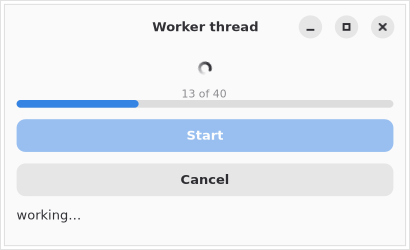
The full example is examples/gtk4/threads/worker-thread.py.
Breaking work up
For work that divides neatly, there is a third option that needs neither a thread nor an async API — do a piece at a time and return to the loop between pieces:
def step(self):
    chunk, self.remaining = self.remaining[:100], self.remaining[100:]
    self.process(chunk)
    self.progress.set_fraction(1 - len(self.remaining) / self.total)
    return GLib.SOURCE_CONTINUE if self.remaining else GLib.SOURCE_REMOVE

GLib.idle_add(self.step)
An idle callback runs when the loop has nothing better to do, so the interface stays responsive and the work still finishes promptly. No thread, no locking, and you can touch widgets directly because you never left the main thread.
Size the chunk so each pass is a few milliseconds. Too small and the overhead dominates; too large and you are back to stuttering.
asyncio
Sooner or later you will want a library that is async def all the way down —
httpx, aiohttp, asyncpg. GTK runs a GLib main loop and asyncio runs its
own, and the old advice was that only one of them can own the main thread.
That is no longer true. PyGObject 3.50 ships an asyncio event loop that is the
GLib main loop. Install it and there is one loop, GTK turns it, and async def
code runs on it. Wrap the call to run():
import asyncio
from gi.events import GLibEventLoop

app = Adw.Application(application_id="com.example.AsyncioAwait")
app.connect("activate", on_activate)

with GLibEventLoop(None):
    sys.exit(app.run(sys.argv))
Two things follow from that, and both are large.
Gio’s async methods become awaitable
Omit the callback argument from any Gio *_async method and you get an awaitable
back instead. The *_async/*_finish pair — two functions, with the interesting
part split across them — collapses into one line:
async def read_file(self):
    file = Gio.File.new_for_path("example.txt")
    ok, contents, _etag = await file.load_contents_async()
    self.view.get_buffer().set_text(contents.decode("utf-8", "replace"))
Compare that with the callback version in the section above, which
needs on_read, on_read_done, and a load_contents_finish() whose failure
mode you have to remember to catch. Here failure is an ordinary exception at the
point of the await:
try:
    ok, contents, _etag = await file.load_contents_async()
except GLib.Error as error:
    self.status.set_text(f"read failed: {error.message}")
A coroutine may touch widgets
This is the part that matters most, and it is the reverse of everything in the
threads section. A coroutine on this loop runs on the main thread, between
frames, like any other main loop source. The one rule is not being
broken, because there is no other thread: setting a label inside an async def
is exactly as safe as setting it in a clicked handler. No GLib.idle_add, no
marshalling, no result-and-error tuple threaded back through a callback.
asyncio.gather also just works, because there is a running loop:
async def gather(self):
    self.status.set_text("three at once…")
    results = await asyncio.gather(slow(0.3), slow(0.2), slow(0.1))
    self.status.set_text(" / ".join(results))
Two traps
Keep a reference to your tasks. asyncio holds only a weak reference to a
running task. Drop yours and it can be garbage collected in the middle of an
await, which presents as work that silently never finishes — no error, no
result. Hold them in a set and discard each one as it completes:
def spawn(self, coro):
    task = asyncio.ensure_future(coro)
    self.tasks.add(task)
    task.add_done_callback(self.tasks.discard)
    return task
Create tasks from inside the loop, not before it. With the context-manager
form there is no current event loop until run() starts turning it, so this
fails:
with GLibEventLoop(None):
    asyncio.ensure_future(startup())   # RuntimeError: There is no current event loop
    app.run(sys.argv)
From activate onwards — and from every signal handler after it — it works.
Start your first coroutine in activate.
Cancellation is asyncio’s: task.cancel() raises asyncio.CancelledError inside
the coroutine at its next await. Catch it if you have something to clean up,
and re-raise.
The full example is examples/gtk4/threads/asyncio-await.py.
The older forms
You will meet two other spellings of this.
asyncio.set_event_loop_policy(GLibEventLoopPolicy()) is what the PyGObject
documentation shows and what most existing code does. It works, and unlike the
context manager it gives you a loop before run() starts. But event loop
policies are deprecated in Python 3.14 and removed in 3.16, so new code
should prefer GLibEventLoop.
Before PyGObject 3.50 there was no integration at all, and the answer was to give
asyncio a thread of its own for the life of the program, submitting coroutines to
it with run_coroutine_threadsafe — the only asyncio function that is safe to
call from another thread — and marshalling results back with GLib.idle_add.
examples/gtk4/threads/asyncio-bridge.py is that program, kept because you will
still meet it, and because it is what you need if you are stuck on an older
PyGObject. It carries a trap of its own: run_coroutine_threadsafe takes a
coroutine, and asyncio.gather() off the loop thread does not return one, so
gather has to be wrapped in an async def first.
The third-party bridges, gbulb and asyncio-glib, solved this before PyGObject did. They are no longer the answer.
Choosing
- Waiting on a file, a socket, a subprocess or D-Bus
- A Gio
*_asynccall. No thread. Real cancellation. - A long computation, or a blocking library with no async version
- A thread, with
GLib.idle_addfor every interface update. - Work that divides into pieces
GLib.idle_addreturningSOURCE_CONTINUE. No thread at all.- An
async deflibrary GLibEventLoop, on PyGObject 3.50 or later. An asyncio loop on its own thread if you are stuck below it.- Several I/O operations at once, whose results update the interface
GLibEventLoopandasyncio.gather. The coroutine can set the widgets itself.- Making pure-Python computation actually faster
multiprocessing, orGio.Subprocess.
Summary
- Widgets are main-thread only.
gdk_threads_enter()is gone and has no replacement. GLib.idle_addandGLib.timeout_addare safe from any thread and are the whole interface between a worker and the interface.- Return
SOURCE_REMOVEorSOURCE_CONTINUEdeliberately; falling off the end returnsNone, which means remove. - Prefer a Gio async call to a thread.
Gio.Cancellablereally stops the work; athreading.Eventonly asks. - One cancellable per operation.
- Threads want
daemon=True, a cancel flag, a disabled start button and a spinner. - The GIL means a thread moves Python work off the main thread rather than making it faster.
with GLibEventLoop(None):aroundrun()makes asyncio’s loop the GLib main loop. Gio’s*_asyncmethods then return awaitables when you omit the callback.- A coroutine on that loop runs on the main thread, so it may touch widgets. This is the reason to prefer it to a thread.
- Hold a reference to every task; asyncio only holds a weak one.
- Create your first task from
activate, not beforerun(). - Event loop policies still work but are removed in Python 3.16.
Drawing with Cairo is next.