Chapter 12 · GTK 4 with PyGObject
Embedding Web Content
Every listing in this chapter is a file under
examples/gtk4/web/. They are run on each build, so if one of them stops working the build says so.
Introduction
The previous edition of this book explained how to embed Mozilla with
gtkmozembed, and how to put an Internet Explorer control in a GTK window on
Windows. Both are gone, and have been for a long time. What is left is
WebKitGTK, and it is in much better shape than either of them ever was: a
current browser engine, multi-process, sandboxed, maintained alongside Safari’s,
and packaged by every distribution.
You would embed it for three reasons: to show documentation or a preview inside your application, to render content that is genuinely HTML — an email, a Markdown preview, a report — or to build an application whose interface is HTML and whose logic is Python.
# Debian, Ubuntu
sudo apt install gir1.2-webkit-6.0

# Fedora
sudo dnf install webkitgtk6.0
Get the version right
gi.require_version("WebKit", "6.0")
from gi.repository import WebKit
This trips up everyone once, because there are three namespaces in circulation:
| Namespace | Toolkit | Status |
|---|---|---|
WebKit 6.0 |
GTK 4 | what you want |
WebKit2 4.1 |
GTK 3 | the previous generation |
WebKit2 4.0 |
GTK 3, libsoup 2 | end of life |
Most tutorials and most Stack Overflow answers are WebKit2, and the class names
inside are nearly identical, so code copied from one to the other looks right and
fails at require_version. The API version and the library version are also not
the same number — WebKit 6.0 reports itself as WebKit 2.52.
A browser
view = WebKit.WebView()
view.load_uri("https://gnome.org/")
That is a working browser widget. Everything else is chrome around it.
State arrives as properties, so it is notify:: again:
view.connect("notify::uri", self.on_uri_changed)
view.connect("notify::estimated-load-progress", self.on_progress)
view.connect("notify::title", self.on_title_changed)
History is not a property, though, and this is a trap worth naming.
can_go_back() and can_go_forward() are methods, not properties, so
bind_property("can-go-back", …) fails at runtime with “has no property called
can-go-back”. Refresh those from load-changed instead:
def on_load_changed(self, view, event):
    self.back.set_sensitive(view.can_go_back())
    self.forward.set_sensitive(view.can_go_forward())
    if event == WebKit.LoadEvent.FINISHED:
        self.progress.set_visible(False)
load-changed reports STARTED, REDIRECTED, COMMITTED and FINISHED.
FINISHED fires whether the load worked or not — a failure is load-failed
first, then FINISHED.
load_uri() wants a real URI. A bare gnome.org is not one, so a browser has to
fix up what the user types:
if "://" not in text:
    text = "https://" + text
The full example is examples/gtk4/web/browser.py.
Deciding what the page may do
decide-policy fires before anything is navigated to, opened in a new window, or
downloaded, and it is where an embedded view stops being a browser:
def on_decide_policy(self, _view, decision, decision_type):
    if decision_type == WebKit.PolicyDecisionType.NAVIGATION_ACTION:
        uri = decision.get_navigation_action().get_request().get_uri()
        if not uri.startswith("https://docs.example.com/"):
            decision.ignore()               # refuse it
            Gtk.UriLauncher(uri=uri).launch(self, None, None)   # or hand it over
            return True
    decision.use()
    return True
Three answers: use() allows it, ignore() refuses it, and download() turns it
into a download. You must call one of them and return True, or the decision is
left hanging and the page stops.
For a view that shows your content, this is where you keep it that way: allow your own origin, and send everything else to the user’s real browser. A help viewer that will happily navigate to any link in the document is a help viewer that can be pointed anywhere.
Running JavaScript
view.evaluate_javascript(
    "document.title",
    -1,                  # length; -1 means nul-terminated
    None, None, None,    # world, source uri, cancellable
    self.on_evaluated,
)


def on_evaluated(self, view, result, _data=None):
    try:
        value = view.evaluate_javascript_finish(result)
    except GLib.Error as error:
        return
    print(value.to_string() if value.is_string() else value.to_json(0))
Asynchronous, like everything else, and the result is a JSCValue rather than a
Python object. is_string(), is_number(), is_array() and friends ask what it
is; to_string() and to_json(0) get it out. to_json() is the pragmatic choice
for anything structured — take the JSON and hand it to json.loads().
Never build a script by formatting a string with user data into it. It is
eval with the same consequences it has anywhere else. Pass values in by defining
a function in the page and calling it with JSON.stringify-safe arguments, or by
setting them through the message channel below.
Letting the page call back
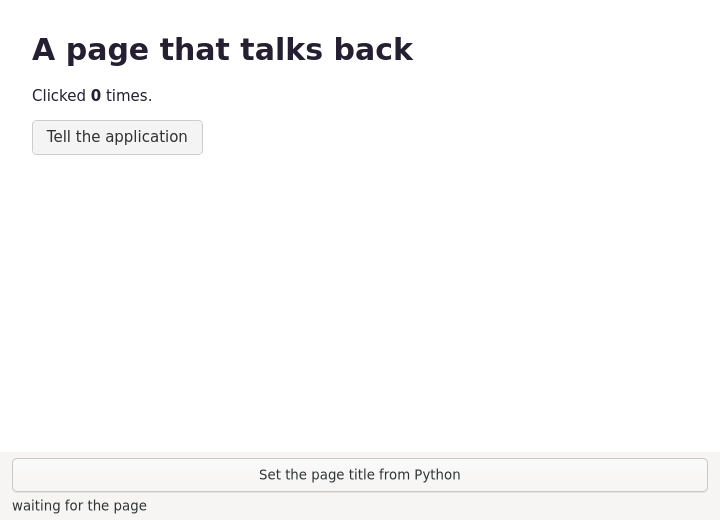
The other direction is a script message handler. Register a name, and it appears
in the page as window.webkit.messageHandlers.<name>:
manager = WebKit.UserContentManager()
manager.register_script_message_handler("fromPage", None)
manager.connect("script-message-received::fromPage", self.on_message)

view = WebKit.WebView(user_content_manager=manager)
window.webkit.messageHandlers.fromPage.postMessage(
    JSON.stringify({clicks: count})
);
def on_message(self, _manager, value):
    payload = value.to_string()         # a JSCValue again
The content manager has to be attached when the view is created — it is a construct-only property, so creating the view first and adding the manager afterwards silently does nothing.
UserContentManager also injects scripts and stylesheets into every page a view
loads:
manager.add_script(WebKit.UserScript.new(
    "console.log('injected before the page runs');",
    WebKit.UserContentInjectedFrames.TOP_FRAME,
    WebKit.UserScriptInjectionTime.START,
    None, None,
))
START runs before the page’s own scripts, which is where you set up an API for
the page to use. END runs after the document is parsed, which is where you
modify what is there.
The full example is examples/gtk4/web/javascript-bridge.py, which does both
directions.
Treat the page as untrusted
A message handler is a hole through the sandbox that you made on purpose. Once a
page can call postMessage, anything that ends up in that page can call it — an
advert, an injected script, a compromised CDN, a link the user followed.
So: only expose handlers to content you control, validate every payload as if it
came off the network, keep handlers narrow and specific (save_document, not
run_command), and never accept a file path from the page and act on it without
checking. Combine it with decide-policy so the view cannot navigate somewhere
you did not intend in the first place.
Loading your own HTML
view.load_html(PAGE, "file:///")
The second argument is the base URI, and leaving it None causes puzzling
failures later: the page is treated as having no origin, so relative URLs do not
resolve and anything origin-checked — fetch, local storage, modules — is
refused.
For a view that shows content you ship, Gtk.Template-style resource loading is
the usual approach: put the HTML, CSS and images in a GResource and register a
custom URI scheme so the page can load them:
session = view.get_network_session()
session.get_website_data_manager()      # cookies, cache, storage all live here
WebKit.NetworkSession is where cookies, the cache and website data live in
WebKit 6.0. An ephemeral session — WebKit.NetworkSession.new_ephemeral() —
keeps nothing on disk, which is what you want for a preview pane or anything
private.
Settings worth changing
settings = view.get_settings()
settings.set_enable_developer_extras(True)          # right-click, Inspect
settings.set_enable_write_console_messages_to_stdout(True)
settings.set_enable_javascript(False)               # for a preview pane
settings.set_user_agent_with_application_details("MyApp", "1.0")
The developer tools are the same Web Inspector Safari uses, and having them in your own application while debugging a bridge is worth the one line.
The sandbox
WebKitGTK runs the web content in a separate, sandboxed process, using bubblewrap and user namespaces. That is a feature and occasionally an obstacle: in a container without permission to create namespaces, the web process cannot start and the view dies with
bwrap: Creating new namespace failed: Operation not permitted
The fix in a container is to allow user namespaces. There is an environment
variable that turns the sandbox off, and its name —
WEBKIT_DISABLE_SANDBOX_THIS_IS_DANGEROUS — is the documentation. It is
acceptable in a throwaway test container, which is how the examples in this
chapter are checked on machines that cannot do namespaces. It is not acceptable
anywhere a real page will be loaded.
Summary
gi.require_version("WebKit", "6.0")for GTK 4.WebKit2is the GTK 3 one, and is what most of the search results are about.WebKit.WebView()plusload_uri()is a browser; the rest is chrome.- Load state is properties and
load-changed, butcan_go_back()is a method — there is nothing to bind to. decide-policyis where you keep an embedded view from wandering. Answer withuse(),ignore()ordownload()and returnTrue.evaluate_javascript()is asynchronous and returns aJSCValue;to_json(0)is the practical way out.- A script message handler is how the page calls you. Attach the
UserContentManagerwhen you create the view, and treat everything that comes through it as untrusted input. load_html()needs a base URI or the page has no origin.
Internationalization is next.