Chapter 13 · GTK 4 with PyGObject
Internationalization
Every listing in this chapter is a file under
examples/gtk4/i18n/. The example ships a real German translation, and the build extracts, compiles and runs it, so the pipeline described here is a pipeline that works.
Introduction
Internationalization is making a program able to be translated; localization is
translating it. The mechanism is gettext, it has not changed in twenty years,
and most of what the previous edition said about it is still true. What has changed
is the tooling around it: libglade is gone, gtk-builder-convert is gone,
intltool has been superseded by xgettext reading .ui files directly, and
Meson generates the whole pipeline from a few lines.
Three things have to line up, and getting two of them right produces an untranslated program with no error message at all:
- Strings are marked in the source and extracted into a
.pofile. - The compiled
.mofile is installed where gettext looks for it. - The program binds its text domain — twice, once for Python and once for the C library, which is the part that is specific to GTK.
Marking strings
import gettext

_ = gettext.gettext
ngettext = gettext.ngettext

self.set_title(_("Greeter"))
_() is a convention, not a language feature: it is short, and xgettext looks
for it by name. Some of the shapes that come up:
_("Your name")                                   # a string to translate now
N_("Deferred")                                   # mark it, translate it later
ngettext("one file", "{n} files", n).format(n=n) # a plural
pgettext("verb", "Greet")                        # disambiguate by context
N_() is for strings that have to be marked where they are defined but
translated where they are used — a table of menu labels at module level, for
instance. It does nothing at runtime; it just gives xgettext something to find.
Plurals
ngettext("You have said hello once.",
         "You have said hello {count} times.",
         self.count).format(count=self.count)
Do not write if n == 1. English has two plural forms, Japanese has one, Polish
has three, Arabic has six, and the rule for choosing between them lives in the
Plural-Forms header of each .po file. ngettext applies whichever rule the
translator’s language needs, and your code never learns what it was.
Context
The same English word is often two different words elsewhere. “Open” as a verb on
a button is not “Open” as a state in a status line; German needs Öffnen and
Geöffnet. pgettext lets the translator tell them apart:
def pgettext(context, message):
    lookup = f"{context}\x04{message}"
    translated = gettext.gettext(lookup)
    return message if translated == lookup else translated
That \x04 is how gettext encodes a context, and the fallback is what makes an
untranslated string come back without the context glued to the front of it.
Formatting
Never build a sentence by concatenation.
_("Hello, {name}!").format(name=name)      # good
_("Hello, ") + name + "!"                  # untranslatable
Word order differs between languages, and a translator has to be able to move the
parts around. Named placeholders are better than positional ones for the same
reason: {name} tells the translator what will be there, and can be reordered
without counting.
Comments for translators
A translator sees the string and nothing else. If it is ambiguous, say so:
# Translators: this is the window title.
self.set_title(_("Greeter"))
xgettext --add-comments=Translators: copies those into the .po file. It costs
a line and saves a round trip.
The GTK-specific part
This is the section people skip and then spend an afternoon on.
import gettext
import locale

locale.setlocale(locale.LC_ALL, "")

gettext.bindtextdomain(DOMAIN, LOCALE_DIR)
gettext.textdomain(DOMAIN)

locale.bindtextdomain(DOMAIN, LOCALE_DIR)     # the C library's copy
locale.textdomain(DOMAIN)
Three separate traps live in those six lines.
setlocale(locale.LC_ALL, "") is required. Without it the C library stays in
the C locale, and nothing is translated no matter how correct everything else
is. The empty string means “take it from the environment”.
The domain has to be bound twice. gettext.bindtextdomain() sets it for
Python’s _() calls. locale.bindtextdomain() sets it for the C library — and
that is the one GtkBuilder uses when it translates translatable="yes" strings
out of a .ui file. Bind only the Python one and your code is translated while
your interface files are not, which is a confusing half-working state.
On Windows, locale.bindtextdomain does not exist. Python’s locale module
does not expose it there, and you have to call into libintl-8.dll with ctypes:
import ctypes
libintl = ctypes.cdll.LoadLibrary("libintl-8.dll")
libintl.bindtextdomain(DOMAIN.encode(), LOCALE_DIR.encode())
libintl.bind_textdomain_codeset(DOMAIN.encode(), b"UTF-8")
Strings in .ui files
<interface domain="greeter">
  <template class="GreeterAboutWindow" parent="GtkWindow">
    <property name="title" translatable="yes">About</property>
    <child>
      <object class="GtkLabel">
        <property name="label" translatable="yes"
                  comments="Shown under the title">A small example.</property>
      </object>
    </child>
    <child>
      <object class="GtkButton">
        <property name="label" translatable="yes" context="verb">Close</property>
      </object>
    </child>
  </template>
</interface>
translatable="yes" marks it, context= is the equivalent of pgettext, and
comments= is the equivalent of a Translators: comment. The domain attribute
on <interface> says which text domain the file belongs to.
Modern xgettext reads .ui files directly — you list them alongside the .py
files and it works out the rest. That is what intltool used to be for, and it is
why a modern project has no intltool-extract, no .h files generated from XML,
and no .in files.
The pipeline
Four commands, in order. The example wraps them in
update-translations.sh; a real project has Meson generate them.
Extract the strings into a template:
xgettext \
  --from-code=UTF-8 \
  --add-comments=Translators: \
  --keyword=_ \
  --keyword=N_ \
  --keyword=ngettext:1,2 \
  --keyword=pgettext:1c,2 \
  --output=po/greeter.pot \
  greeter.py window.ui
The --keyword arguments are how xgettext learns your calls. ngettext:1,2
says arguments one and two are the singular and the plural; pgettext:1c,2 says
argument one is a context and argument two is the string. Omit them and plurals
and contexts are silently missed.
Start a language, once:
msginit --locale=de --input=po/greeter.pot --output=po/de.po
Merge later changes into existing translations:
msgmerge --update --backup=none po/de.po po/greeter.pot
msgmerge keeps the translations that still apply and marks the ones whose source
string changed as fuzzy — translated, but needing review. Fuzzy entries are
not used at runtime, which is deliberate: a stale translation is worse than an
untranslated string.
Compile to the binary format gettext reads:
msgfmt --check --output-file=locale/de/LC_MESSAGES/greeter.mo po/de.po
That path is not negotiable. gettext looks in
<locale dir>/<language>/LC_MESSAGES/<domain>.mo and nowhere else. Nearly every
“my translations do not load” is a wrong path, a wrong domain, or a .mo that
was never recompiled after the .po changed.
--check catches the mistakes that would otherwise show up as a crash in one
language: a translation with a %s where the original had %d, or a missing
placeholder.
Testing it
LANGUAGE=de python3 greeter.py
LANGUAGE=de LC_ALL=de_DE.UTF-8 python3 greeter.py
LANGUAGE looks like the convenient one: it overrides only the message language,
takes a colon-separated list of fallbacks, and does not need the locale to be
generated on your system.
It is not enough on its own, and the way it fails is confusing. The C library
ignores LANGUAGE when the locale is C, and setlocale(LC_ALL, "") leaves you
in C if no LC_* variable is set. Python’s gettext module reads LANGUAGE
itself, so it does not care — which means LANGUAGE=de alone gives you a program
whose Python strings are German and whose .ui strings are English:
$ LANGUAGE=de example-app
TITLE:  Example App           # from window.ui — not translated
LABEL:  2-mal gezählt.        # from ngettext() in Python — translated

$ LC_ALL=de_DE.UTF-8 LANGUAGE=de example-app
TITLE:  Beispielanwendung
LABEL:  2-mal gezählt.
So test with a real locale. locale -a lists what you have and
sudo locale-gen de_DE.UTF-8 adds one. If you see exactly the split above —
code translated, interface files not — the cause is either this or a missing
locale.bindtextdomain, and they look identical from the outside.
The example in this chapter builds its widgets in Python rather than from a .ui
file, so LANGUAGE on its own is enough for it — which is why both of these are
the same program with one environment variable changed:
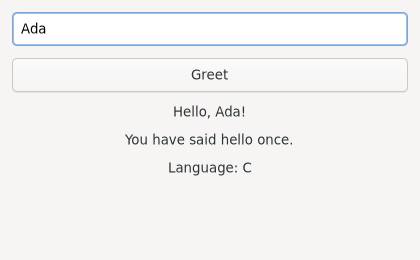
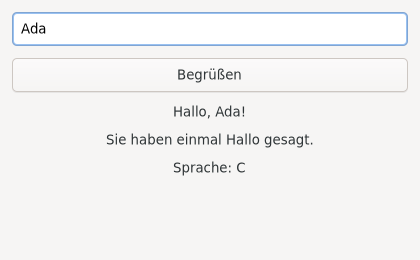
Note that the plural is not a suffix on a number: “You have said hello once”
becomes “Sie haben einmal Hallo gesagt”, a different sentence, which is what
ngettext is for.
Two habits worth building. Check a pseudolocale before you have translators:
msgfmt a .po where every string is wrapped in brackets, and anything unbracketed
in the running application is a string you forgot to mark. And check a language
whose words are much longer than English — German is the traditional choice — to
find the buttons your layout cannot grow to fit.
More than words
Translation is the biggest part of this, not all of it.
Dates, numbers and currency follow the locale, not the language. Use
GLib.DateTime.format() with the %x and %X placeholders, or Python’s
locale.format_string() and babel, rather than assembling them yourself.
Right-to-left languages need the whole interface mirrored, and GTK does it for
you — provided you never wrote LEFT or RIGHT. Use Gtk.Align.START and
Gtk.Align.END, set_margin_start() and set_margin_end(), and the mirroring is
free. Test it without knowing any Arabic:
GTK_DEBUG=interactive python3 app.py # the Inspector can flip direction
Sorting is not sorted(). GLib.utf8_collate_key() gives you a key that sorts
the way the user’s locale expects, which is the difference between an ä next to an
a and an ä at the end of the alphabet.
Icons and colours carry meanings that do not travel. So does text in images — which is a good reason to draw text with Pango rather than shipping a picture of it.
Summary
_(),N_(),ngettext()andpgettext()mark strings; format with named placeholders and never concatenate.- Bind the text domain twice:
gettext.bindtextdomainfor Python andlocale.bindtextdomainfor the C library, or.uifiles stay untranslated. locale.setlocale(locale.LC_ALL, "")or none of it works.xgettextreads.uifiles directly;intltoolis not needed any more.--keywordarguments teachxgettextabout your plurals and contexts.- Fuzzy entries are deliberately ignored at runtime.
.mofiles go in<locale dir>/<language>/LC_MESSAGES/<domain>.mo, exactly.- Test with
LANGUAGE=de, a pseudolocale, and a right-to-left language. - Use
START/ENDrather thanLEFT/RIGHTand mirroring is free.
Testing is next, and then Packaging and Distribution, which is where the translations, the desktop file, the icon and the schema all get installed together.